NATS + Ignition MQTT: Sparkplug B from Edge to Subscriber
Alex Miller — October 5, 2026
I’ve been building out an IIoT pipeline using NATS as the backbone for Sparkplug B telemetry from Ignition SCADA. This post covers the Docker setup: standalone NATS with JetStream and MQTT, Ignition Transmission publishing from the edge, and a Python subscriber decoding Sparkplug B on the other end.
No leaf nodes, no hub. Just a single NATS server you can drop anywhere and start connecting clients.
What we’re building
Ignition Transmission (edge)
        │
        │  MQTT / Sparkplug B  (tcp://<NATS_HOST>:1883)
        ▼
  NATS + JetStream (Docker)
        │
        │  NATS core  (nats://localhost:4222)
        ▼
  Python subscriber  (decodes Sparkplug B protobuf)
Everything is in the nats-ignition repo.
Stand up NATS
Two Docker files.
docker-compose.yml
services:
  nats:
    image: nats:latest
    container_name: nats
    restart: unless-stopped
    ports:
      - "4222:4222"   # NATS client
      - "8222:8222"   # HTTP monitoring
      - "1883:1883"   # MQTT
    volumes:
      - ./nats.conf:/etc/nats/nats.conf
      - nats-data:/data/jetstream
    command: ["-c", "/etc/nats/nats.conf"]

volumes:
  nats-data:
    driver: local
nats.conf
port: 4222
http_port: 8222
server_name: "nats"
jetstream: enabled

jetstream {
  store_dir: "/data/jetstream"
}

accounts {
  DEFAULT: {
    users: [
      { user: "nats-client", password: "natspass123" }
    ]
    jetstream: enabled
  }
}

mqtt {
  port: 1883
  ack_wait: "1m"
  max_ack_pending: 100
  no_auth_user: "nats-client"
}
no_auth_user lets MQTT clients connect without credentials. Ignition Transmission doesn’t send credentials by default, so this keeps the config simple.
# Linux / Mac
docker compose up -d

# Windows
docker-compose up -d
Verify it’s running:
curl http://localhost:8222/varz
Configure Ignition Transmission
In Ignition Designer, go to MQTT Transmission, Settings, Servers, and add a server:
| Field | Value |
|---|---|
| Name | Nats-Gen |
| URL | tcp://<NATS_HOST>:1883 |
Note: The screenshots below show port
1880instead of1883. I mapped the host port to1880on my test machine to avoid conflicts with other MQTT brokers I had running. The repo and config use the standard1883:1883mapping – change the host port if you need to do the same.
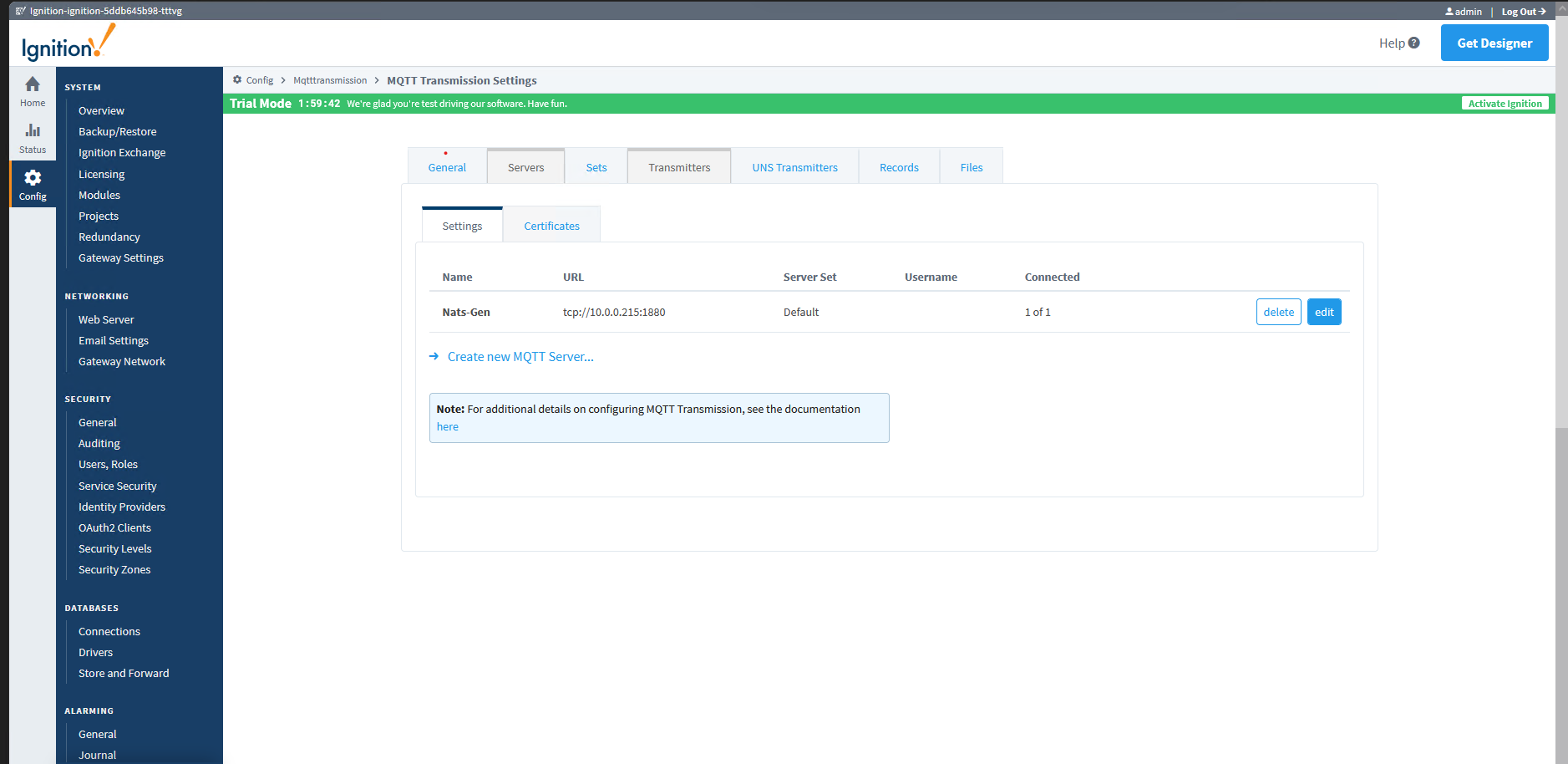
Then set your Group ID and Edge Node ID under Transmitters. These become the Sparkplug B namespace segments.
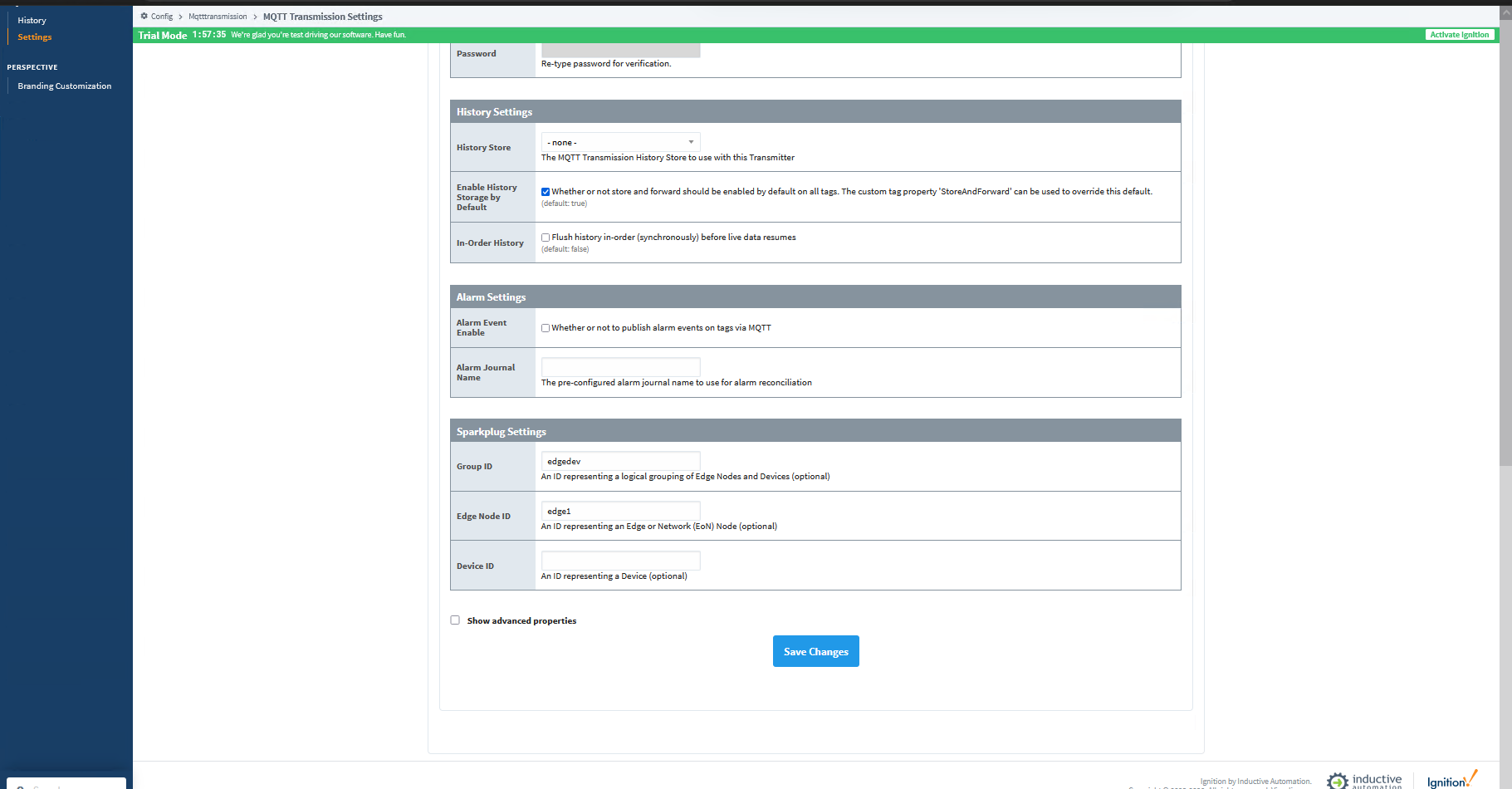
Watch your naming. NATS maps MQTT topics directly to subjects. Dots (.) are the NATS subject delimiter, so a dot in your Group ID or Edge Node ID will break things. No spaces either. Use underscores or hyphens: site_01, edge-01, device_01. Tag names inside the Sparkplug payload are fine since they don’t hit the topic.
Configure Ignition Engine
Engine subscribes to NATS and surfaces the tags in Ignition’s tag tree. Add a server under MQTT Engine, Settings, Servers:
| Field | Value |
|---|---|
| Name | Nats-Local |
| URL | tcp://<NATS_HOST>:1883 |
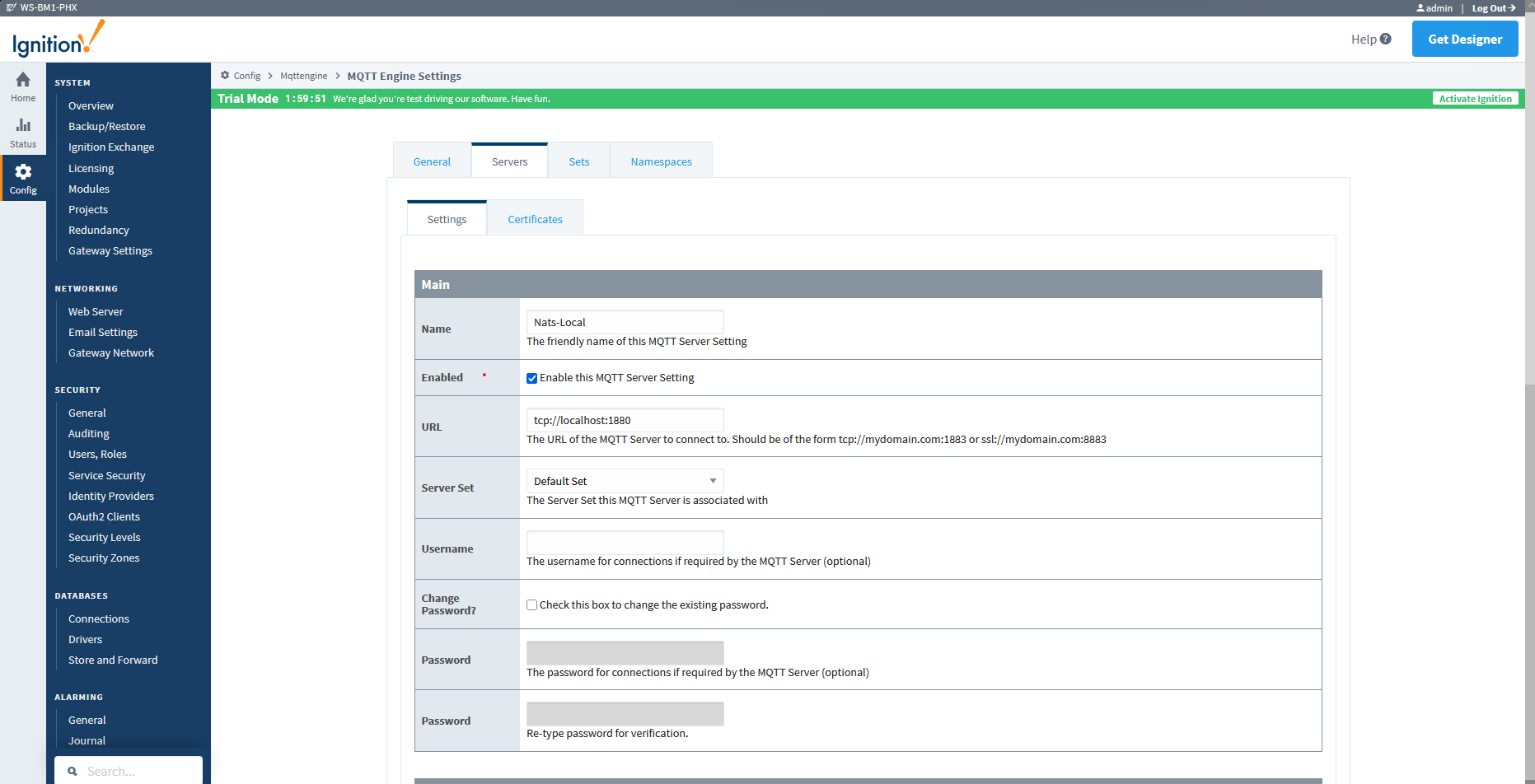
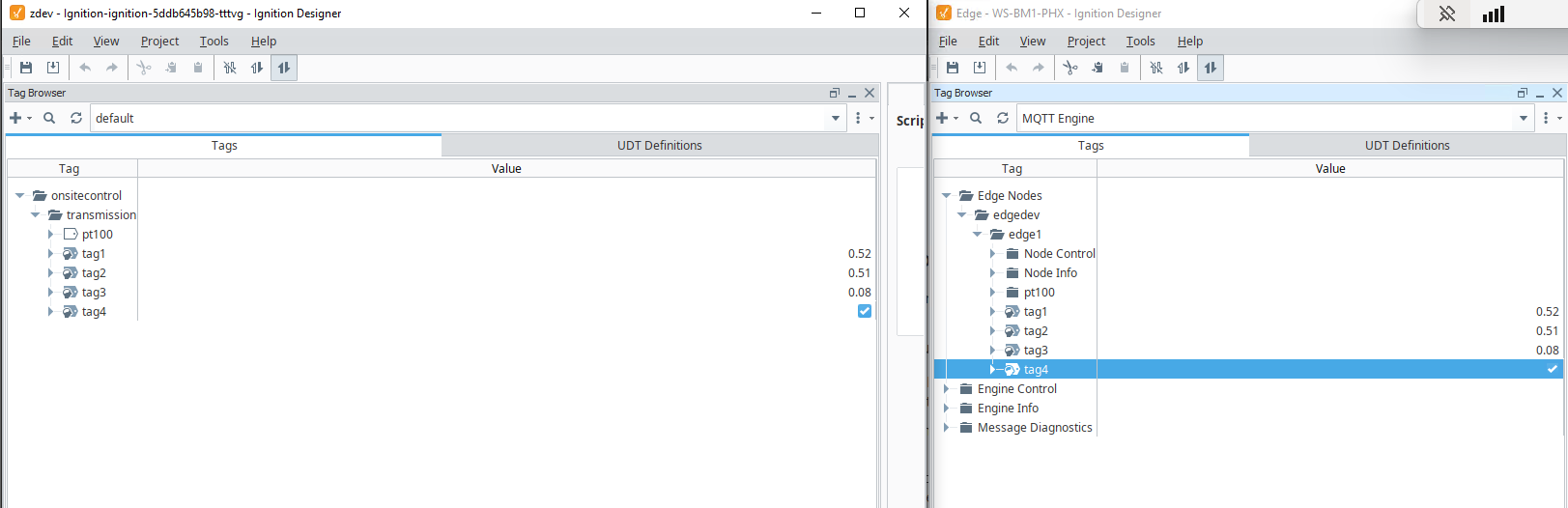
Once Engine connects and Transmission publishes its first DBIRTH, tags appear under Edge Nodes / <GroupID> / <EdgeNodeID> in the tag browser. The left side below is the source in Transmission, the right is Engine receiving the same tags with live values.
Verify NATS connections
Hit the monitoring endpoint to confirm MQTT clients are connected:
curl http://localhost:8222/connz
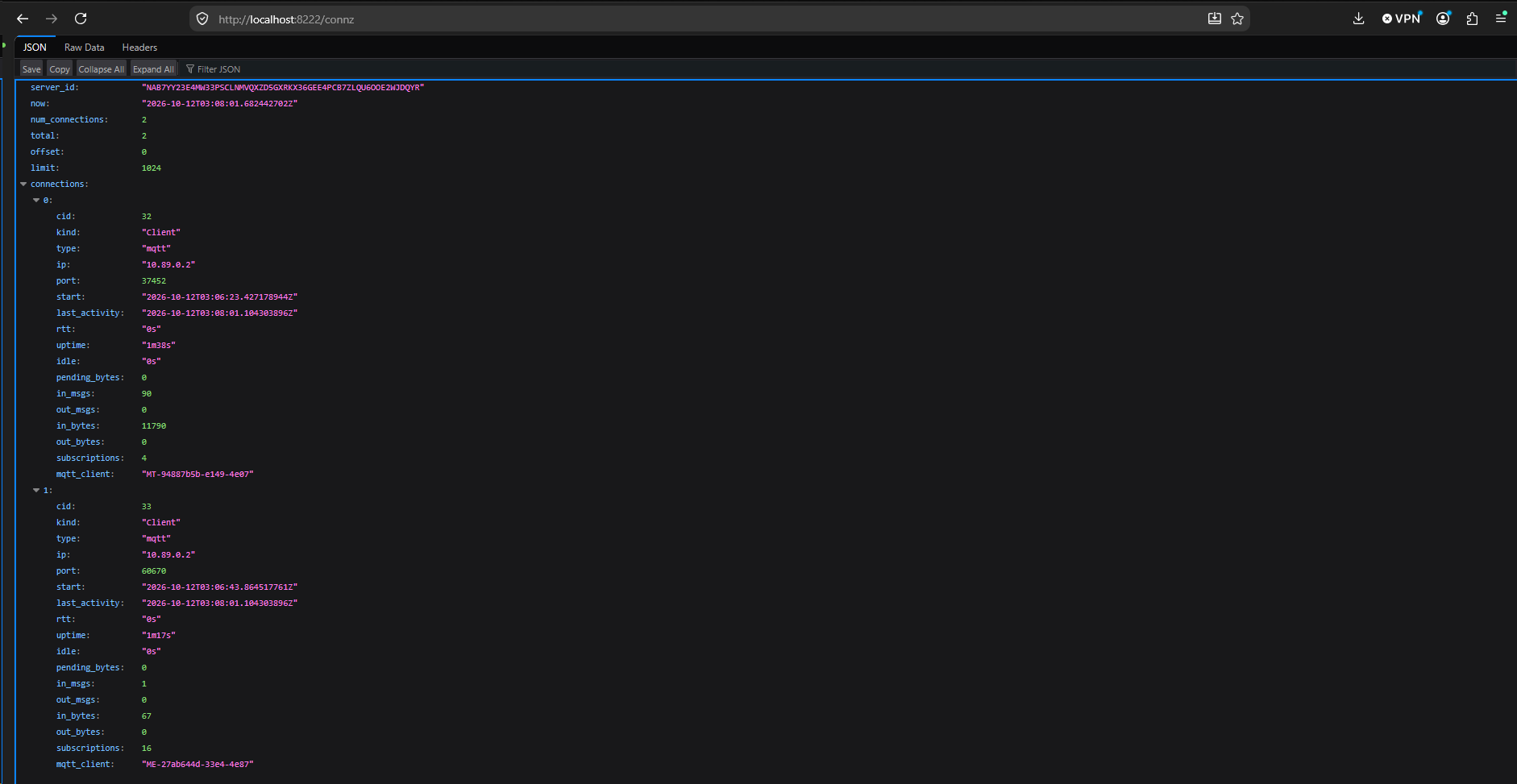
Two MQTT clients, in_msgs climbing – that’s Transmission publishing Sparkplug B data.
Python subscriber
pip install nats-py
python examples/subscriber.py
Connects on port 4222 (NATS, not MQTT) and subscribes to everything. To decode Sparkplug B, generate the protobuf module first:
pip install grpcio-tools
python -m grpc_tools.protoc \
  -I examples/sparkplug \
  --python_out=examples/sparkplug \
  examples/sparkplug/sparkplug_b.proto
With it, you get decoded metrics:
{
  "subject": "spBv1.0/edgedev/DDATA/edge1/MDCTransmitter",
  "timestamp": 1727123456789,
  "seq": 4,
  "metrics": {
    "tag1": 0.52,
    "tag2": 0.51,
    "tag3": 0.08,
    "tag4": true
  }
}
Point it at a remote server:
python examples/subscriber.py \
  --server nats://nats-client:natspass123@10.0.0.215:4222 \
  --subject "spBv1.0/>"
Repo: github.com/code-runner-100/nats-ignition
About the Author
Alex Miller is a Staff Instrumentation & Controls Engineer at Crusoe Energy with a background spanning Manufacturing, Aerospace, Oil and Gas, and industrial data center infrastructure. He specializes in controls system architecture, designing IIoT pipelines, SCADA systems, and the software infrastructure that ties them together.
Crusoe Energy is a vertically integrated AI infrastructure company building sustainable, high-performance data centers powered by low-carbon energy.
Back to Blog